Annual vs Monthly CRM Plans: Which Saves You More Money Long-Term

There is a moment in almost every CRM purchase that goes something like this: you have done the research, you have chosen the platform, you are ready to sign up - and then someone mentions you can save 20 or 30 percent by committing to a full year. And in the momentum of the decision, you say yes.
Sometimes that is exactly the right call. Sometimes it costs you more than the discount ever saved you. And the difference between those two outcomes usually comes down to one thing: whether you stopped to actually think it through before clicking confirm.
That is what this guide is for. Real numbers, honest trade-offs, and a clear way of thinking about annual vs monthly CRM plans that fits where your business actually is - not where you hope it will be in twelve months.
1. Let's Talk About What is Happening Here
The billing decision feels small. It isn't.
Pick annually when your team is not ready, and you are locked into a platform through six months of friction, a restructure that changes your headcount, or a pivot that means you need something completely different. Choose monthly when your team is settled and stable, and you are essentially leaving 20 to 40 percent of your CRM budget on the table - year after year.
Neither outcome is catastrophic in isolation. But compounded over two or three years, across a growing team, the billing decision you make this week quietly becomes a meaningful number in your budget.
The good news is that this is actually one of the few software decisions that has a genuinely clear answer - once you are asking the right questions. So let's go through them.
2. The Real Numbers - What Each Platform Offers You
Before anything else, let's look at what is actually on the table. Because the discount range across CRM platforms varies far more than most people realise - and knowing the real numbers changes how you weigh the decision.
Pipedrive has some of the best annual discounts in the market - between 30 and 51 percent savings depending on which plan you are on. Monthly billing runs $24, $49, $79, and $99 per user. Annual brings those down to $14, $24, $49, and $69. For a 10-person team on the Growth plan, that's a difference of $1,800 every single year. The saving grows with your team size, which means the annual decision gets more compelling the more people you have.
Zoho CRM saves you between 20 and 34 percent by going annually. Standard drops from $20 to $14 per user - saving $72 per user per year. Professional drops from $35 to $23 - saving $144 per user per year. For a 10-person team on Professional, that is $1,440 back in your budget annually just from the billing choice. The Enterprise plan saves $120 per user per year. Solid savings across every tier.
HubSpot is where things get interesting - and honestly, a little more complicated. At Starter level, monthly billing is available. But at Professional and Enterprise, annual commitment is essentially required. There is no monthly option at those tiers. Marketing Hub Professional moves from $800 on annual to $890 monthly - about a 12 percent premium. The real issue is not the percentage though. It is that if you need HubSpot's full AI suite and advanced features, the annual contract is not a choice - it is the condition of access. Better to know that going in.
GoHighLevel saves around 17 percent annually across its plans - Starter moves from $97 to $81, Unlimited from $297 to $248. Consistent and straightforward across tiers, which is refreshing.
Brevo and Klaviyo both offer 10 percent savings on annual billing. Modest compared to some of the platforms above, but still worth calculating at scale - Brevo's Professional plan saves around $600 per year on annual billing.
Salesforce generally locks you into annual at most meaningful tiers - Enterprise and above require a 12-month commitment as standard. The consumption-based AI costs (Flex Credits, conversation pricing) sit on top of that subscription regardless of billing cycle, so the billing cycle conversation is really just the baseline. 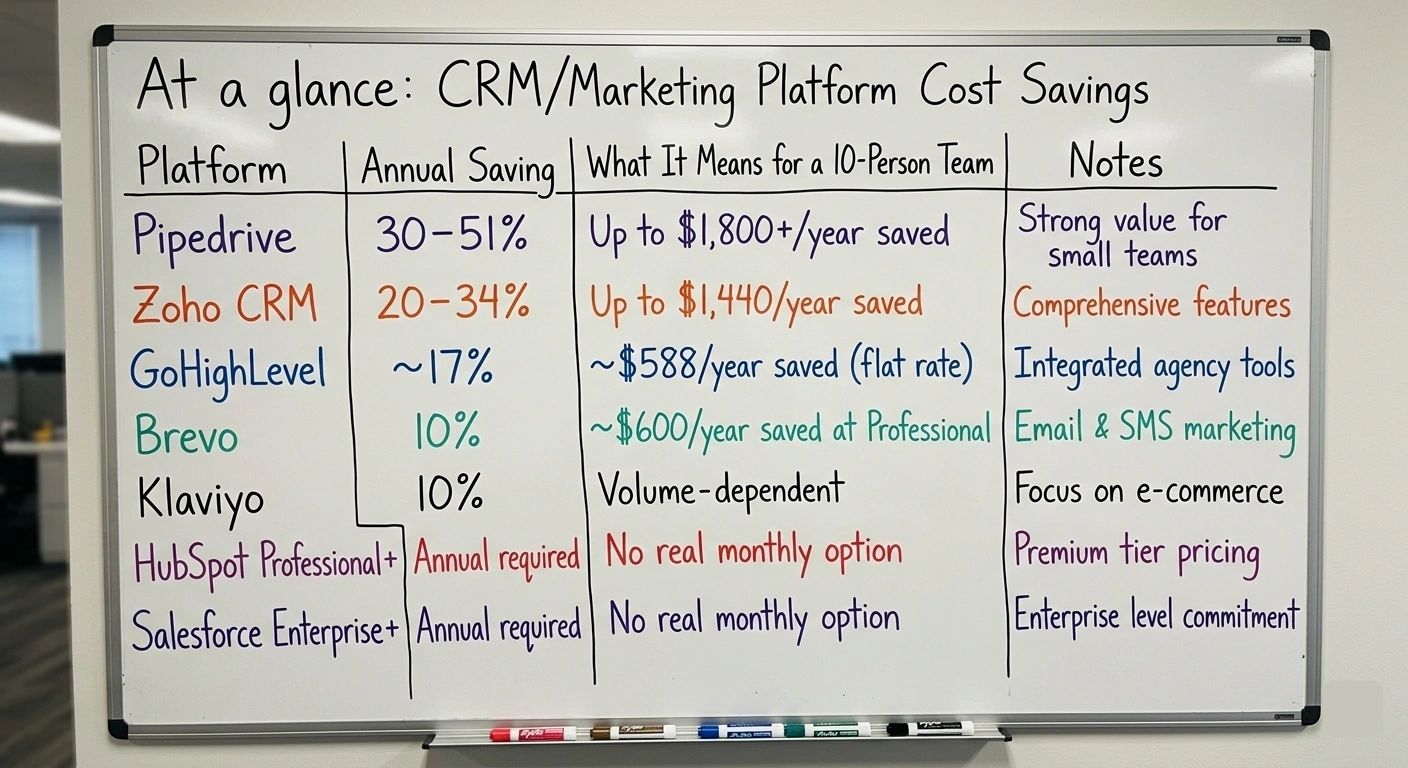
3. When Annual Billing Is Genuinely the Smart Move
Annual billing earns its place when most of the following are true for your business. Not just one of them - most of them.
Your team size has been consistent. The biggest risk with annual billing is being locked into seats you no longer need - or discovering mid-contract that adding new seats is priced differently than expected. If your headcount has been stable for six months or more and you are not anticipating big changes, that stability is what makes an annual commitment safe.
You have already been using the platform for a few months. This one matters more than people think. The worst possible time to go annual is at signup - when you have no idea how your team will actually use the tool day to day. The best time is after 60 to 90 days of real usage, when you know which features your team relies on, which ones they ignore, and whether the platform genuinely fits how you work. Many businesses start monthly, validate the fit properly, then switch to annual at their first renewal. That approach gets you the best of both.
The savings are meaningful relative to your budget. Run the actual number. For a 10-person team on Pipedrive Growth, going annual saves $1,800 per year. For a 5-person team on Zoho Professional, it saves $720. Whether that number justifies the commitment depends on your specific situation - but put it on a spreadsheet and look at it directly. The abstract "save 30 percent" becomes a lot more concrete when you see what it actually is in dollars.
You are in a position to negotiate. Here is something most people don't know: annual commitments are leverage. Real transaction data shows that buyers who reference credible alternatives and commit to annual - or multi-year - terms routinely secure 15 to 25 percent below listed rates on platforms like HubSpot and Salesforce. The listed annual price is the starting point, not the final word. Especially on larger team sizes, negotiating before you commit is almost always worth the conversation.
The features you need only exist on annual tiers. At HubSpot Professional and Enterprise, and most Salesforce tiers above Pro Suite, you essentially don't have a choice - annual is the condition of access to the capabilities you need. If that's where you are, budget for it from day one and factor the mandatory onboarding fees in as a completely separate line item. Don't let them come as a surprise in month one.
4. When Monthly Billing Is Actually Worth the Premium
Monthly billing has a reputation as the expensive, non-committal choice. But sometimes it is the most financially intelligent decision you can make.
You are in your first 90 days on a new platform. No matter how thorough your research was, real usage reveals things that demos simply don't. Workflows that don't quite fit your process. Features that sounded essential but go untouched.
Integrations that need more configuration time than you anticipated. Pay monthly for at least your first two billing cycles. Then commit annually with actual evidence that the platform works for your team - not just a feeling that it will.
Your team size is actively changing. Growing businesses that are adding headcount every quarter face a particular challenge with annual CRM billing. Adding seats mid-contract often means paying for them at a different rate, or navigating pro-rating that complicates your finance team's life. If you are in a genuine growth phase where team size is volatile and unpredictable, monthly billing gives you cleaner numbers even if the per-seat cost is higher.
You are a seasonal or project-based business. Some businesses genuinely need CRM capacity that fluctuates through the year - agencies with project cycles, event-based companies, retailers with seasonal peaks. Monthly billing lets you scale seats up and down without renegotiating annual contracts. The premium is the cost of that operational flexibility, and for the right business model, it is entirely worth paying.
You are currently evaluating alternatives. If you are on a platform and actively considering switching, staying monthly on your existing tool while you evaluate gives you a clean exit whenever you're ready. Committing to another year on a platform you are about to leave is genuinely one of the most common and avoidable billing mistakes in this market.
Cash flow is a real constraint right now. Annual billing typically means paying upfront, or at least in larger chunks. For early-stage businesses managing the runway carefully, spreading the cost across monthly payments is a legitimate financial decision - even if the total annual cost is higher. The math changes when you factor in what that upfront payment costs in terms of cash that could be deployed elsewhere in the business.
5. The Stuff Nobody Warns You About
The annual vs monthly conversation almost always focuses on the discount percentage. Here is what it misses.
Switching costs are always higher than they look going in. The real cost of a bad annual commitment is not the remaining months of subscription fees - it is the migration. Data export, team retraining, integration rebuilding, productivity loss during the transition - these consistently exceed the annual subscription premium that triggered the switch. Taking the time to get the platform right before committing is worth significantly more than any discount you capture by committing early.
Mid-year headcount changes complicate annual contracts in ways you don't expect. Adding users mid-annual commitment typically means paying the full annual rate for new seats, pro-rated for the remaining months. Removing seats almost never generates a refund - you have committed to that spend. For businesses where team size is not predictable 12 months out, these dynamics erode the annual savings faster than most people account for when they sign.
Onboarding fees apply regardless of billing cycle. HubSpot's $1,500 to $3,000 mandatory onboarding fee hits whether you pay monthly or annually. It is a one-time charge sitting on top of either billing model. Always factor it into your year-one total before the billing cycle discussion becomes the main event - because it changes the math on what "saving 20 percent" actually means in year one.
The most expensive CRM is not the one with the highest subscription. It is the one your team uses at 20 percent of its capability while paying for 100. Whether you are on annual or monthly, utilisation is what determines real value. A less expensive platform used consistently and well beats a more expensive platform used badly on any billing model. 
Is Your Bigger Question Which Platform to Choose?
The billing decision is only worth having once you have sorted the platform. If you are still weighing that up, let's start there.
Find your CRM match in two minutes
6. A Simple Way to Make the Call
Here is a practical framework that cuts through the noise. No spreadsheet required.
Less than 90 days on the platform? Stay monthly. Validate the fit first. Come back to this decision when you have real usage data to work with.
Been using it for 6+ months and genuinely happy with it? Run the annual savings calculation for your specific team size. If the annual saving is larger than your realistic switching cost estimate - typically three to six months of subscription - annual billing is the financially stronger choice.
Team growing quickly and unpredictably? Stay monthly until growth stabilises, then negotiate an annual rate based on your projected team size for the next 12 months. Lock in the number that reflects where you are heading, not just where you are today.
The platform requires annual commitment for the features you need? Accept the model, negotiate the rate, and treat the onboarding fees as a completely separate budget line. Don't combine them in your mental model of what the subscription costs - they are different things.
Actively considering a switch from your current platform? Go monthly on the new platform until you are 60 days in and genuinely confident in the fit. The monthly premium is cheap insurance against committing to something you will want to leave.
7. What to Know Before You Sign With Each Platform
Pipedrive: The annual discount here is genuinely one of the best available - 30 to 51 percent. If you have been on Pipedrive for more than 60 days and your team is settled, annual is almost always the right financial call. The savings compound meaningfully with team size and grow even more at higher tiers.
Zoho CRM: The 20 to 34 percent annual discount is solid, and Zoho's flexibility with monthly contracts makes the start-monthly-then-switch approach genuinely easy to execute. The Professional tier has the largest per-user saving - prioritise going annually there first if you're on a mixed-tier team.
HubSpot: At Starter, monthly is worth using as a validation window. At Professional and Enterprise, annual is essentially non-negotiable - budget for it from the beginning and include the mandatory onboarding fee as a completely separate line. Don't let it arrive as a surprise.
GoHighLevel: The 17 percent annual saving is consistent across plans. Because GoHighLevel uses flat-rate rather than per-seat pricing, the calculation is simpler - it is just the platform fee, not a per-user compound. Use your first monthly cycle to confirm your sub-account structure, then lock in annually when you know exactly what you need.
Salesforce: Annual commitment is the standard at any meaningful tier. The more important billing conversation with Salesforce is the consumption model on top - Flex Credits and conversation pricing add to your total regardless of how your base subscription is structured. Model your expected AI usage volume carefully before signing, and build in a buffer while your team's usage patterns settle in the first few months.
Klaviyo and Brevo: The 10 percent annual saving is the smallest in this comparison, but at higher sending volumes the absolute number adds up. The billing cycle matters less for these platforms than for seat-based CRMs - the more important decision is which contact volume or email tier to start at. Start slightly lower than you think you need and upgrade when you hit the limit. It's almost always cheaper than over-provisioning from day one.
8. Questions Worth Asking
Is annual CRM billing always cheaper than monthly?
Per month, yes - annual billing consistently costs less across every platform that offers both options, with savings ranging from 10 percent on Brevo and Klaviyo to over 50 percent on certain Pipedrive plans. But CRM annual billing savings only materialise if you use the platform for the full term. If you switch mid-year, you've effectively paid the annual rate for partial use - which can cost more than monthly billing would have from the start.
When does monthly billing actually make more financial sense? Monthly billing is the smarter call when you are in your first 60 to 90 days on a new platform, when your team size is actively changing, when you are planning a switch within 12 months, or when paying upfront annually would constrain cash flow in a way that creates real operational risk. The billing premium buys you flexibility - and there are absolutely situations where that flexibility is genuinely worth paying for.
Can I negotiate annual CRM pricing?
Yes - more than most people realise. Real transaction data shows buyers who reference competitive alternatives and commit to annual or multi-year terms routinely secure 15 to 25 percent below listed rates on platforms like HubSpot and Salesforce. The listed annual price is the opening position, not the final word. Knowing when to choose an annual CRM subscription includes knowing that choosing it is a negotiating moment, not just a checkout decision.
What happens if I need to add team members to a mid-annual contract?
It depends on the platform. Most add new users at the full annual rate, pro-rated for the remaining contract period. GoHighLevel's flat-rate model is the exception - adding users within your plan's unlimited allowance doesn't change your cost. Before you sign an annual contract, ask your sales contact exactly how mid-cycle seat additions are priced. It is a simple question that can meaningfully change your year-one maths.
Should I start monthly and switch to annual later?
For most businesses, yes - and this is honestly the approach I would recommend most often. Use the monthly period to genuinely validate that the platform fits your team's daily workflows, then switch to annual at your first renewal with real evidence to back the decision. Many platforms allow mid-cycle switches to annual billing, so you don't even have to wait for contract expiry to capture the savings. 
9. Here is Where This All Lands
The annual vs monthly CRM plans decision has a genuinely clear answer for most businesses. It just requires asking the right questions before you make it - not after.
If your team is stable, you have had enough time on the platform to know it genuinely fits, and the annual saving is material relative to your budget, go annual. The CRM annual billing savings across the platforms in this guide range from meaningful to significant - especially on Pipedrive and Zoho, where the discount can exceed 30 percent and compounds meaningfully with team size.
If you are in your first 90 days, your team is growing fast, or you are not yet fully confident in the platform fit, stay monthly. The premium is real. So is the protection it gives you. And the cost of switching out of a bad annual commitment - in time, in data migration, in team disruption - is always higher than the discount you would have saved by rushing in.
The one thing that matters more than the billing cycle is the platform fit. No discount makes the wrong CRM worth staying on. And no monthly premium makes the right CRM not worth having.
Get the platform right first. Then decide how you want to pay for it.
Ready to Find the CRM Worth Committing To?
The billing decision is the easy part once you are confident in the platform. Let's get you there.
See what your HubSpot year one should cost
Two minutes with the assistant gets you an itemized estimate. A free 20-minute call gets you a yes or a no on taking your onboarding fee to $0 — plus the negotiation tips for a deal your size.
Book a free 20-minute callNo obligation. Independent — not a HubSpot partner. Run by RevOps operators whose agency is a certified HubSpot Solutions Partner.
Keep reading
What HubSpot's onboarding fee actually buys you
HubSpot's mandatory onboarding fee runs from $1,500 to $7,000 depending on the hub and tier. Here is what is inside it, when it is worth paying, and the two situations where a partner can deliver the same scope instead.

HubSpot vs Klaviyo vs SalesForce: Best CRM Value
Value is not the lowest price tag. What each of these three platforms actually gives you per dollar, and which business each one was really designed for.